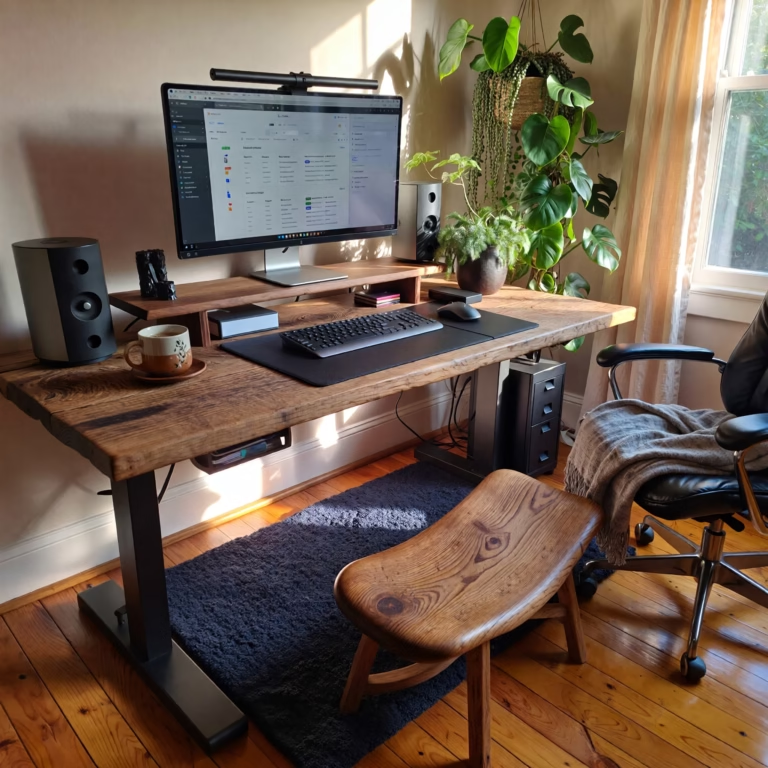
Monitor Setup Ideas for Remote Workers: Single vs Dual Monitors
Table of Contents
Introduction to Remote Work Monitor Setups
The shift towards remote work has gained substantial momentum in recent years, transforming the dynamic of traditional office environments. This paradigm shift, accelerated by technological advancements and various global events, has introduced new challenges and opportunities for professionals in the workforce. One crucial aspect that can significantly affect productivity and overall job satisfaction in a remote setting is the monitor setup.
A well-designed monitor setup is vital for enhancing efficiency, ensuring comfort, and fostering a conducive work atmosphere. Research indicates that the visual workspace directly impacts a remote worker’s ability to focus, manage tasks, and reduce eye strain. Whether an individual opts for a single monitor or a dual monitor configuration can play a pivotal role in their daily workflow. The choice between these setups can influence not only how tasks are organized but also how information is accessed and utilized.
When considering the best monitor setup, several factors come into play. First, the nature of work and the need for multitasking must be evaluated. A single monitor can offer simplicity and help minimize distractions, whereas a dual monitor setup enhances the ability to work concurrently on multiple applications. Comfort is another key consideration; ergonomics can affect long-term health and productivity. Additionally, the space available for a workstation and personal preferences should influence the decision-making process.
As remote work continues to be a permanent aspect of many careers, understanding the importance of an effective monitor setup becomes increasingly essential. Choosing between a single and dual monitor arrangement requires careful assessment of work habits, physical workspace, and personal comfort preferences, all of which contribute to maximizing remote work efficiency.
Pros and Cons of Single Monitor Setup
The single monitor setup is often favoured for its simplicity and cost-effectiveness, particularly among remote workers. One of the primary advantages is the reduced expense associated with the purchase of a single screen, along with savings in energy consumption. For those on a limited budget or operating from a home office with minimal resources, investing in a single monitor can be a prudent decision. Moreover, a single monitor requires less desk space, which is particularly beneficial for smaller work environments. With fewer devices, maintaining a tidy workspace becomes easier, contributing to an overall enhanced focus during work hours.
However, there are notable disadvantages to consider when opting for a single monitor. The primary limitation is the constraint it places on multitasking. Workers who frequently juggle multiple applications may find it challenging to switch between windows efficiently. This can lead to a slower workflow and diminished productivity, especially if one is accustomed to broader perspectives provided by dual monitors. Furthermore, prolonged usage of a single monitor can lead to eye strain and poor posture if not adjusted correctly, which emphasizes the need for ergonomic considerations such as monitor height and distance.
Optimizing a single monitor setup can significantly enhance productivity. Remote workers can utilize software tools like virtual desktops or split-screen functionalities to simulate a dual-monitor experience. Additionally, ergonomic adjustments, such as positioning the monitor at eye level and ensuring adequate lighting, can mitigate health-related issues. By understanding the advantages and limitations of a single monitor setup, employees can make informed choices that best suit their working habits and workspace constraints.
Advantages of a Dual Monitor Setup
Utilising a dual monitor setup has become increasingly popular among remote workers, primarily due to its significant advantages in enhancing productivity and efficiency. One of the foremost benefits is the improved multitasking capabilities it affords users. With two screens, individuals can work on various tasks simultaneously, such as comparing documents or referencing data while composing emails or reports. This seamless transition between tasks is particularly valuable in fast-paced work environments.
In addition to enhanced multitasking, a dual monitor configuration aids in streamlining workflow. Remote workers can dedicate one screen to their primary work application while utilising the second screen for communication tools, such as instant messaging or video conferencing applications. This arrangement minimises the need for constant switching between applications, thereby reducing distraction and time wastage. For professionals engaged in data analysis, graphic design, or programming, having a dedicated screen for visual content or code can lead to a more efficient process, allowing for easier tracking of changes and outcomes.
Moreover, a dual monitor setup can help reduce eye strain—a common issue for remote workers who spend long hours in front of screens. With two monitors, tasks can be spread out, alleviating the pressure of staring at a single screen for extended periods. This can encourage better posture and reduce physical fatigue associated with prolonged screen time.
Specific job roles that particularly benefit from a dual monitor setup include graphic designers, financial analysts, and software developers. Their responsibilities often require frequent reference to multiple datasets or graphical content, making dual monitors an essential tool for optimal performance. For those considering a dual monitor setup, efficient positioning and calibration are vital. It is recommended to align monitors at eye level and about an arm’s length away to minimise discomfort while utilising both screens effectively.
Choosing the Right Setup for Your Needs
When it comes to creating an efficient workspace, one of the pivotal decisions remote workers face is choosing between a single and dual monitor setup. Each configuration offers distinct advantages depending on individual work requirements, available space, budget considerations, and personal preferences.
A single monitor setup may suffice for individuals engaged in straightforward tasks such as writing, data entry, and basic browsing. It typically occupies less desk space and is often more cost-effective, making it an ideal solution for those on a tighter budget or with limited workspace. However, workers involved in multitasking, video editing, or software development often find a dual monitor configuration more effective. This setup enables them to have multiple applications open at once, significantly enhancing productivity and workflow.
In addition to the type of work being performed, available desk space should also influence the choice between single and dual monitors. Remote workers with smaller desks might opt for a larger single monitor to maximise screen real estate without clutter. Conversely, those with ample space could benefit from a dual setup to keep their workspace organised and functional.
Budget constraints are another critical factor. While dual monitor setups may provide increased productivity, they require a higher initial investment. Several options are available that cater to different budgets, from purchasing high-end monitors to exploring second-hand alternatives. Personal preferences also matter; some individuals may simply prefer the simplicity of a single display, while others enjoy the convenience and flexibility offered by two monitors.
Ultimately, the choice between a single and dual monitor setup should align with the remote worker’s specific needs and circumstances. By carefully assessing the factors mentioned, individuals can make an informed decision that enhances their home office environment and overall work experience.
Remote work has evolved from a temporary solution into a long-term reality for millions of professionals worldwide. As home offices replace traditional workspaces, the tools we use daily play a critical role in productivity, comfort, and overall job satisfaction. One of the most impactful—but often overlooked—elements of a remote work setup is the monitor configuration.
Your monitor setup directly affects how efficiently you work, how often you switch between tasks, and even how your body feels at the end of the day. Whether you choose a single monitor or a dual monitor setup can influence focus, multitasking ability, and long-term eye and neck health.
Some remote workers thrive with a clean, minimalist single-monitor desk, while others experience major productivity gains with dual screens. The right choice depends on your job role, workspace size, and personal workflow.
If you’re building or upgrading your workspace, our Ultimate Home Office Setup Guide explains how monitors, desks, chairs, and accessories should work together for maximum comfort and productivity.
Single Monitor Setup: Pros, Cons, and Best Use Cases
A single monitor setup remains a popular choice for many remote workers, especially those working from smaller spaces or on tighter budgets.
Advantages of a Single Monitor Setup
One of the biggest benefits of a single monitor is simplicity. With fewer cables, less hardware, and minimal desk space required, this setup is easy to manage and visually clean. It’s also more affordable, as you only need to invest in one display, which reduces both upfront costs and ongoing energy consumption.
Single monitors are ideal for:
- Writers and editors
- Students and researchers
- Customer support roles
- Administrative tasks
A single display can also help reduce distractions by limiting visual clutter. Many users find that fewer open windows improve concentration and reduce cognitive overload.
A large, high-resolution monitor can significantly improve a single-screen setup. Check out popular 27-inch productivity monitors on Amazon [affiliate-link].
Disadvantages of a Single Monitor Setup
The main limitation of a single monitor is restricted multitasking. Switching constantly between applications, documents, and browser tabs can interrupt workflow and slow productivity—especially for users handling complex tasks.
Additionally, poor positioning or extended use without breaks can contribute to eye strain and neck discomfort if ergonomic best practices are ignored.
Tips to Optimise a Single Monitor Setup
- Use split-screen or virtual desktop features
- Position the monitor at eye level
- Keep the screen about an arm’s length away
- Pair it with an ergonomic keyboard and mouse
With the right adjustments, a single monitor can still be highly effective for remote work.
Dual Monitor Setup: Benefits, Drawbacks, and Ideal Users
A dual monitor setup has become increasingly popular among remote professionals who handle multiple tasks simultaneously.
Advantages of a Dual Monitor Setup
The most notable benefit is enhanced multitasking. Two screens allow you to keep multiple applications open at once—such as documents, spreadsheets, communication tools, and reference materials—without constant switching.
Dual monitors can:
- Improve workflow efficiency
- Reduce task-switching time
- Increase productivity for complex tasks
Remote workers often dedicate one screen to their primary task and the other to supporting tools like email, chat apps, or video calls.
This setup is especially beneficial for:
- Software developers
- Data analysts
- Graphic designers
- Financial professionals
- Content creators
Explore dual monitor bundles and adjustable monitor arms to build a clean, flexible setup [affiliate-link].
Potential Downsides of Dual Monitors
Despite their benefits, dual monitors require more desk space and a higher initial investment. Improper alignment can also cause neck strain if monitors are not positioned correctly.
Power consumption is slightly higher, and managing cables can be challenging without proper accessories.
Ergonomic Tips for Dual Monitor Setups
- Align both monitors at the same height
- Angle screens slightly inward
- Position the primary monitor directly in front of you
- Use a dual monitor stand or arm for flexibility
When set up correctly, dual monitors can significantly improve comfort and efficiency.
Single vs Dual Monitors: Quick Comparison
| Feature | Single Monitor | Dual Monitors |
|---|---|---|
| Cost | Lower | Higher |
| Desk Space | Minimal | Requires more |
| Multitasking | Limited | Excellent |
| Setup Complexity | Simple | Moderate |
| Best For | Writing, admin tasks | Design, coding, analysis |
How to Choose the Right Monitor Setup for Your Remote Work
Choosing between a single and dual monitor setup isn’t about which is “better”—it’s about what works best for your specific needs.
Consider Your Job Role
If your work involves frequent reference to multiple documents, dashboards, or creative assets, dual monitors can dramatically improve efficiency. For focused tasks like writing or data entry, a single large monitor may be sufficient.
Evaluate Your Desk Space
Smaller desks may benefit from a single ultrawide or 27-inch monitor, while larger desks can comfortably support two displays with a monitor arm.
Factor in Your Budget
Dual monitor setups cost more initially, but the productivity gains may justify the investment. Budget-friendly options include mixing a primary monitor with a secondary, lower-cost display.
Think About Personal Preference
Some users prefer a clean, distraction-free environment, while others enjoy the flexibility of multiple screens. Comfort and habit matter just as much as specs.
For a complete breakdown of desks, chairs, monitors, and accessories, visit our Home Office Setup Pillar Guide.
Final Thoughts: Which Monitor Setup Is Best for Remote Work?
Both single and dual monitor setups have their place in modern remote work environments. A single monitor offers simplicity, affordability, and focus, while dual monitors provide unmatched multitasking and workflow efficiency.
The best setup is the one that aligns with your work demands, space, and comfort needs. With proper ergonomics and thoughtful placement, either configuration can support a productive and healthy remote work lifestyle.
Ready to upgrade your workspace? Browse top-rated monitors and accessories for remote work on Amazon [affiliate-link] and build a setup that works for you.
Is a dual monitor setup better for remote work?
A dual monitor setup is often better for remote work because it allows users to multitask more efficiently, keep multiple applications open at once, and reduce time spent switching between windows. It is especially useful for professionals who work with data, design, or multiple documents.
Can a single monitor be enough for working from home?
Yes, a single monitor can be enough for working from home, especially for tasks like writing, data entry, customer support, or basic office work. A large or high-resolution monitor can improve productivity without requiring a second screen.
What size monitor is best for remote work?
For remote work, a 24-inch to 27-inch monitor is ideal for most users. These sizes provide enough screen space for productivity while fitting comfortably on most desks. Ultrawide monitors are also a good option for multitasking without using dual screens.
Does using two monitors increase productivity?
Using two monitors can increase productivity by reducing task-switching time and allowing users to view multiple applications simultaneously. Many remote workers report faster workflows and improved focus with a properly set up dual monitor workstation.
How should monitors be positioned for ergonomics?
Monitors should be positioned at eye level, about an arm’s length away, with the main screen directly in front of the user. Proper positioning helps reduce neck strain, eye fatigue, and long-term posture issues during remote work.